The super key
I used to have this really awesome early 2000’s transparent blue plastic keyboard with all the newest media keys. The only problem was that it had 4 windows keys on it! One on either side of the spacebar. The right side of the spacebar was Alt, Windows, Context menu, CTRL. That was a bit weird but it was alright. The next placements were crazy though. Someone figured there was space for more keys right below the Delete, End and Page Down keys but I guess they couldn’t really figure out what would be best for there so they put a 3rd Windows key, a 2nd Context Menu and then a 4th Windows key right there. This was pretty close to the arrow keys and if anyone remembers gaming in the early 2000’s, pressing the windows key accidentlly would often just crash your game completely. If you could get back into it, it could take quite a while for it to respond again. So if you were playing something like Warcraft 2 multiplayer, that button was a fucking nightmare.
Ugh, I loved the colour of that keyboard so much I put up with all those windows keys.
edit: I can’t believe I found it! I’ve tried searching for this keyboard a few times, but finally found proof on this site!
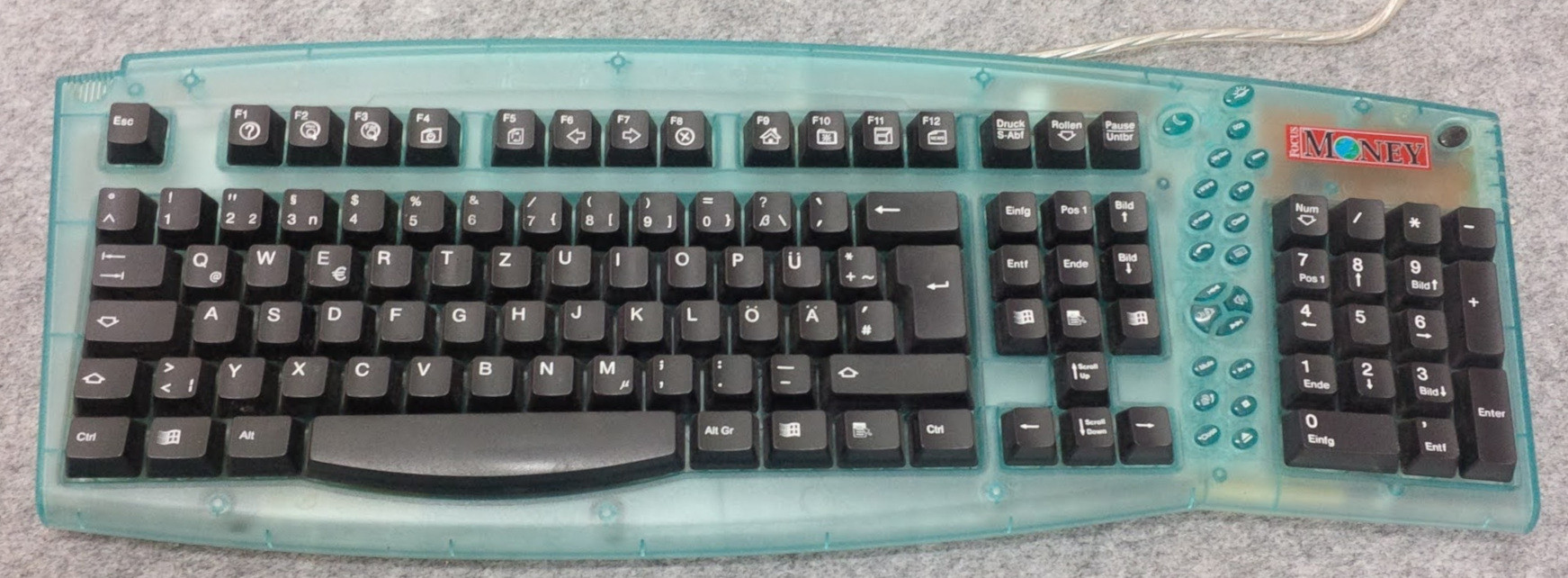
Wow, Win98 logo and media buttons? Truely between eras.
I actually like the context key above the arrow keys, another method of effectively right-click is nice. Those Win keys are crazy though, that’s the perfect place for extra function keys. Imagine having f13 & f14 that you can bind to anything without worry!
I submitted the mysterious extra
nsituation on military keyboards as a question for Lateral and they featured it in today’s episode!Spotify video • Spotify CDN raw file (34:18) • catbox.moe • Podverse.fm clip • Website with transcript
They reserve the right to edit questions and omitted the important
n-lock key. A keyboard with a permanently missing 3 would be ridiculous.Edit: Now it’s also a highlight on YouTube, their second-most-viewed last year, but they didn’t attribute the question to me there, not even in text
Do you know why the
3key has ann? I have a hunch:
This is clearly a tactical keyboard for use in military, aviation or maritime navigation systems! /s
Let’s pray for the day that future generations will know that to be the Super key, but like the floppy disk icon for ‘Save’ they won’t know why it is what it is.
I’ve noticed libreoffice has changed their save symbol. It’s a grey rectangle (taller than it is wide) with a darker grey arrow pointing down.
Download?
Yeah maybe. Could be trying to make it clear it’s not uploading to a cloud or something lol.
Or maybe it means “put it down” (as in record, not discard).
Save? It’s done automatically now. In the cloud!
There are distro decals you can replace with :)
I hate that shit so much. I don’t buy keyboards with the Windows key logo on it anymore.
Why is there a Win-Lock option? I get Caps Lock and Fn-Lock but is there any other reason besides saving a finger for the all-important Win-Ctrl-Alt-Shift-L shortcut to open LinkedIn? /s
Disabled mine a looong time ago
Ooh the key that wrecked video games for decades!
I still don’t get this I don’t think I’ve ever accidentally pressed it while playing a game, and I am someone who constantly presses every wrong key while typing
CTRL and ALT is used a lot in strategy games for example.
I remember playing an FPS game… Heretic? Shadow Warrior? I would play it without a mouse. Alt would be a modifier on the arrow keys for strife (sidestepping). Spacebar to shoot, and you’re set for disaster.
Space Cadet Pinball was another one. It was nice playing with Ctrl, on the corner. But hit the Win key and you instantly lost focus of the window.
Ok now remove fast boot and TPM
Bootloader? Not sure my laptop support it
same…. and that stupid “copilot” button thing… (this is so useless)
i’m gonna turn it to a hotkey or something lol.
UPDATE: i turned the copilot button into a hotkey that opens gnome-characters which has emojis 💯
I recently bought my first mechanical keyboard, after having used my razer for 8 years, and i was looking into different keycaps, but i ended up having a hard time finding a good keycap set that is of good quality, and that i also liked in terms of colors, and has a super key or something like that. The keycaps that i ended up settling on didn’t have a super key, so i just ended up putting the windows menu key on the super key, so that it atleast looks a bit more generic than the actual windows key. It’s too bad they’re hard to find, but i guess it makes sense since there is probably very little demand for it. Another idea is to maybe put a sticker on it or something.
True, I’ve been looking through AliExpress for a good Linux based keycaps but didn’t find anything, sticker is probably my only option
If I was living alone, I would buy blank keycaps.
A bit of acetone will fix that.
Doesn’t have to be
could just replace it, no? Unless your keyboard is weird, the size of window key is pretty standard right?
Not as easy on a laptop, like this is. Usually a pain in the ass to replace laptop chicklet keyboard keys, if you can even find a replacement without a windows icon
Ah that one infinite bindings key.