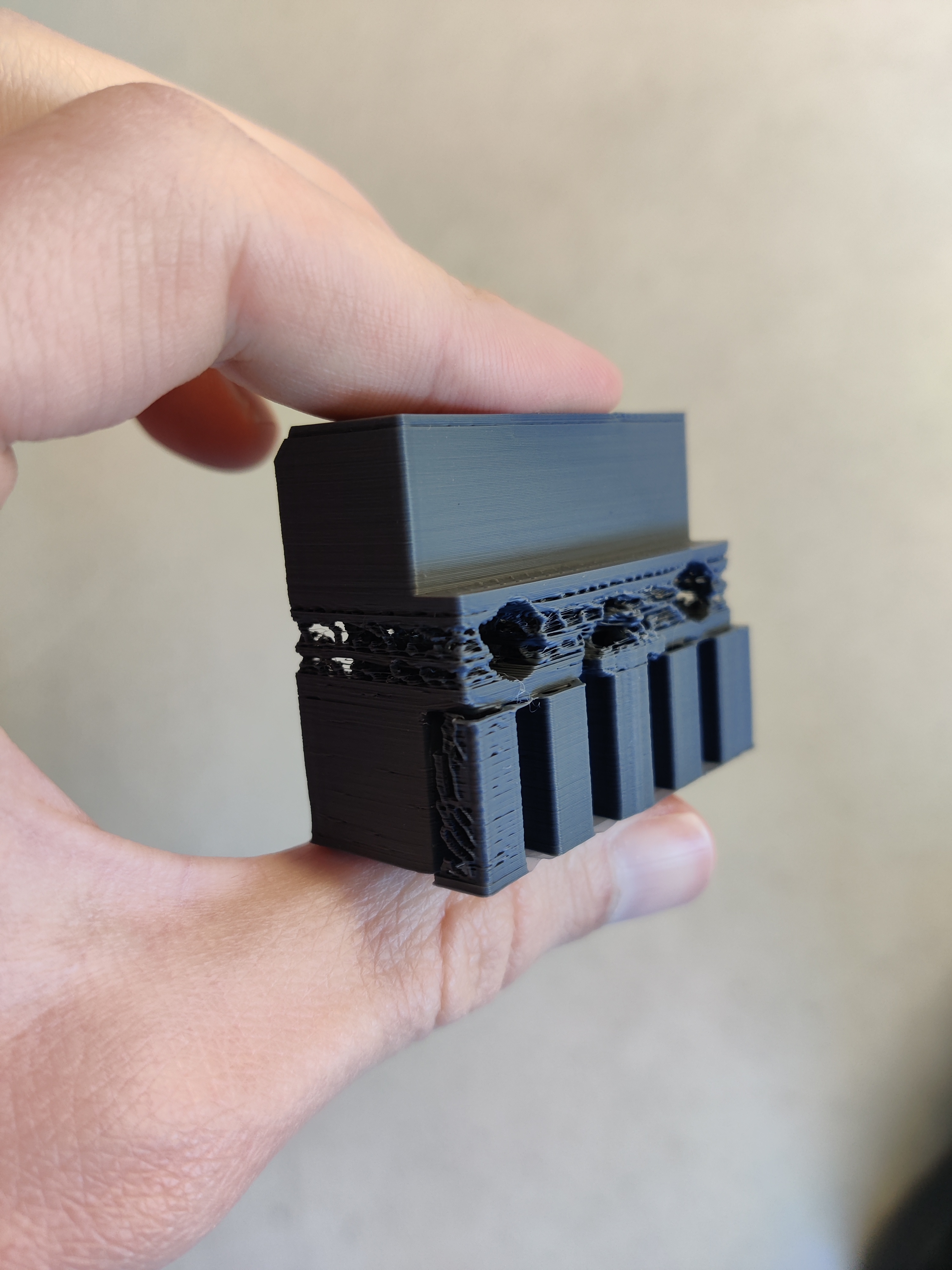
Im working with an old reprap cotroled directly with an Laptop with cura. Filament is RS-Pro (2325395) Pla though. Open around 4 weeks ago but i have this problem in some capacity since i have this Filament. Before i had some really old pla which snapped all the time because it wss so brittle. Is this really just shitty Filament? Help/ Insight would be much appreciated.
Edit: solved. Disabling the retraction worked (as a temporary fix). The Spring of my extruder is too strong so my extruder was eating my filament especially in high retraction areas. The results with my old and hard filament were better because it was so hard the extruder didn’t eat it. Picture is in the comments. Thanks everyone for your help.
You must log in or # to comment.
I’ve had partial clogs that manifest like that.
Cold pulls (several) ended up resolving my issue.my best explanation was, that there was some debris in the nozzle, which would sometimes (nearly) seal the nozzle, and at other times be retracted with the filament, get stuck somewhere else and filament flows freely.
Yeah, I don’t use much PLA but this looks like a partial clog, you can see that where you have long stretches of extrusion it works fine, but when it starts retracting it clogs.
It could very well be that it’s clogging BECAUSE it’s shitty or wet filament, tho. Is your nozzle screwed in correctly, heatbreak too, etc?
I exchange the nozzle for a new one but no luck Disabling retraction worked. But thanks for your suggestion :)
Has the printer been used recently and put out good prints? Has anything about the setup changed including a slicer update or different slicer?
I have two knee jerk reactions
Is there an under-extruded section of the print, similar to the corner closest to the camera on the lower section of the print, on the top section of the print? You might have a retraction/priming problem. A quick retraction test print would make this pretty obvious.
You might have had a partial clog that resolved itself, but the fact that the extrusion issues change with the topology of the design makes me want to suggest something else. Try the print again. If you get the same outcome filament isn’t the primary cause.
Yes the print immediately before was good (see my other commend) 2. Try same settings (left) seems a little bit better but still not good
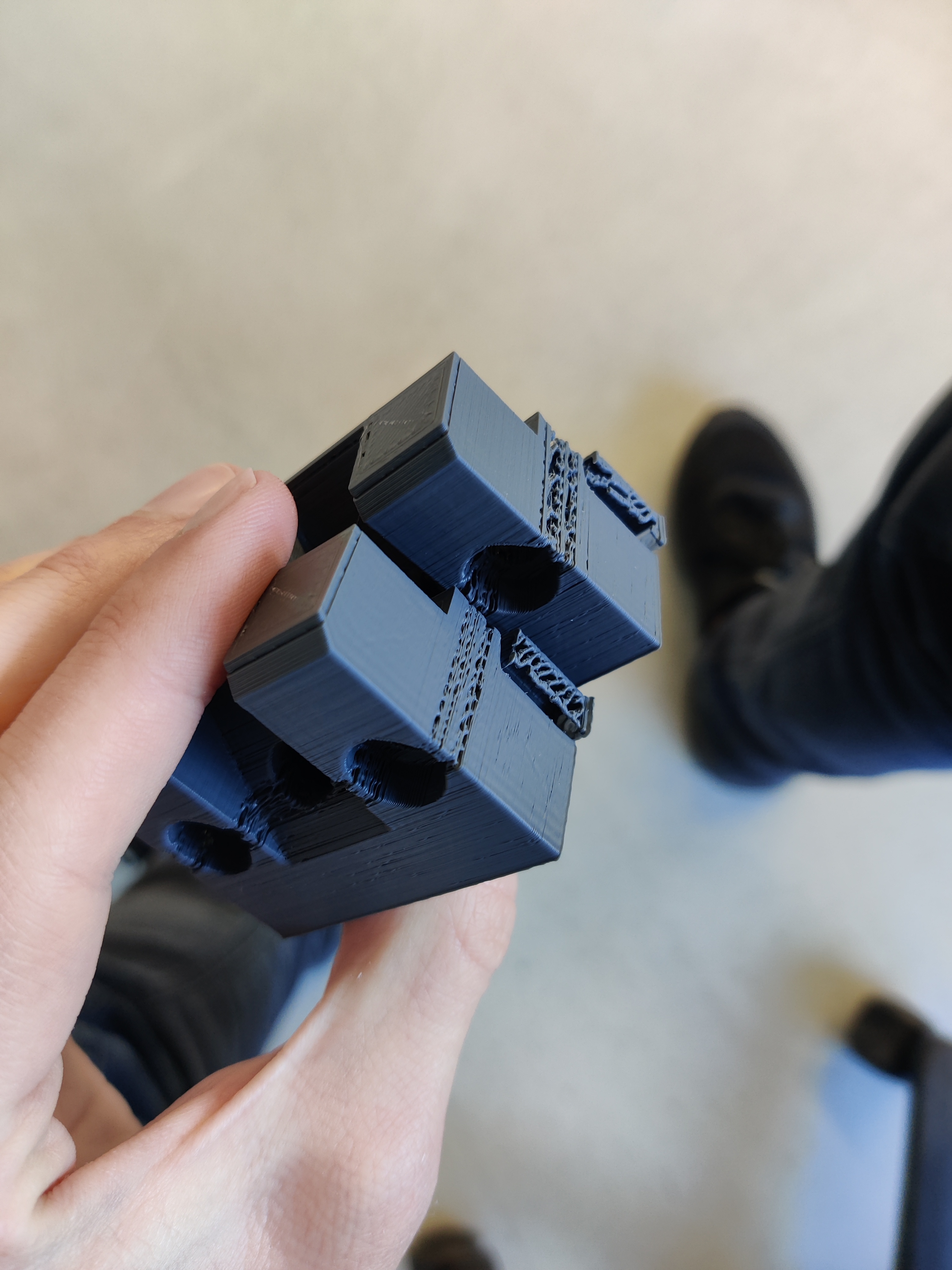
I would strongly suspect a retraction/priming or mechanical related issue give byhe fact that it’s repeatable in the same area of the print.
You were right thanks :)
No problem! I’m glad you were able to get to the bottom of it.
Print i did immediately before. Main differences no supports and less Variationen in horizontal Crosssection ?

I’d wonder about the model or slicer. You had great printing above and below that. Unless you had a nozzle problem that cleared itself up, that’s a weird way to go bad right at that transition, and it’s very symetric on that section.
Result after disabling retraction. (And changing nozzles from 0.8 to 0.4)

Yeah seeing the original I suspected retraction settings since it was mostly in places with lots of retractions.and long paths even out and look smooth.
This fixed the under extrusion which seems to confirm it’s a retraction problem but disabling it entirely you’ve got those oozing artifacts where moves happen.
I’d suggest using a small value for your retraction and probably take the time to use teaching tech or ellis’ tunning guides to tune your retraction settings.
Looks like wet filament to me. Those pock marks are what happens when the moisture immediately evaporates to steam and bursts when it hits the nozzle.