- Microsoft inadvertently highlighted the benefits of using a local account over a Microsoft account on Windows 11 in a recent support page update.
- Using a local account allows for offline sign-in, is independent of cloud services, and limits settings, files, and applications to a single device, enhancing privacy.
- Despite these benefits, Microsoft requires internet access or workarounds for the initial setup of Windows 11, making it challenging to use a local account from the start.
Since they mentioned the workarounds but didn’t explain them, I’m copying my comment from another post a couple of weeks ago.
Lemmy probably isn’t the target audience for this, here’s the steps to bypass the MS account requirement when setting up W11:
Configure your keyboard, but before you select your wifi network press Shift+(Fn)+F10 to open Command Prompt.
Type in the following command and press enter. Your computer will reboot: oobe\bypassnro
After the reboot, configure your keyboard and location settings, and click the option at the bottom of the page to say that you don’t want to connect to the internet
Click the link on the next page to “Continue with limited setup”, then follow the prompts to enter a username and password.
or write your windows ISO using rufus and check the “no MS account” checkbox.
Thr FN part is notable if you have a recent computer. A lot of laptops and keyboards ship out with media keys as the default on the top row now, and you must hold the FN key to use F10. Lot of people don’t realize this and think Shift+F10 isn’t working.
Possibly an easier option: you can let it connect to the internet, and then when it tells you to set up a Microsoft account, click on “Other sign in options” (or whatever it says beneath the text box). Then select “Domain Join instead”. It’ll let you use a local account, expecting you to join it to a domain later, then you just…don’t join it to a domain.
Always be sure to use something like O&O ShutUp10 or Winaero Tweaker after you reach the desktop, so you can shut off all the bullshit, otherwise it will keep harassing you to make an account. I think you need to uninstall OneDrive too, to stop it hijacking the address bar in file explorer with constant nagging to set it up
Good info, but everyone should know that Windows 11 Home can not join domains, and the option will not be there. Only Pro, Enterprise, and Education versions can do that.
Yes, that’s true. But I’m kind of going off the assumption anybody that actually wants to use a local account is somebody who knows better than to use the Home edition. Without group policy and a couple of the other configurable points, I’m not sure how viable it even is to use Home anymore if you want Microsoft off your back.
There is a 3rd party tool that gives you some GP functionality even on home edition: PolicyPlus
Lemmy probably isn’t the target audience for this, here’s the steps to bypass the MS account requirement when setting up W11:
“Install Linux”
Newer versions won’t allow you run the command prompt in the initial setup environment.
I successfully did it on a brand new Inspiron laptop yesterday morning. I do regular device configs for my organization, and the moment this stops working, I’ll be here to rage about it!
That’s good. I had to install from and older iso.
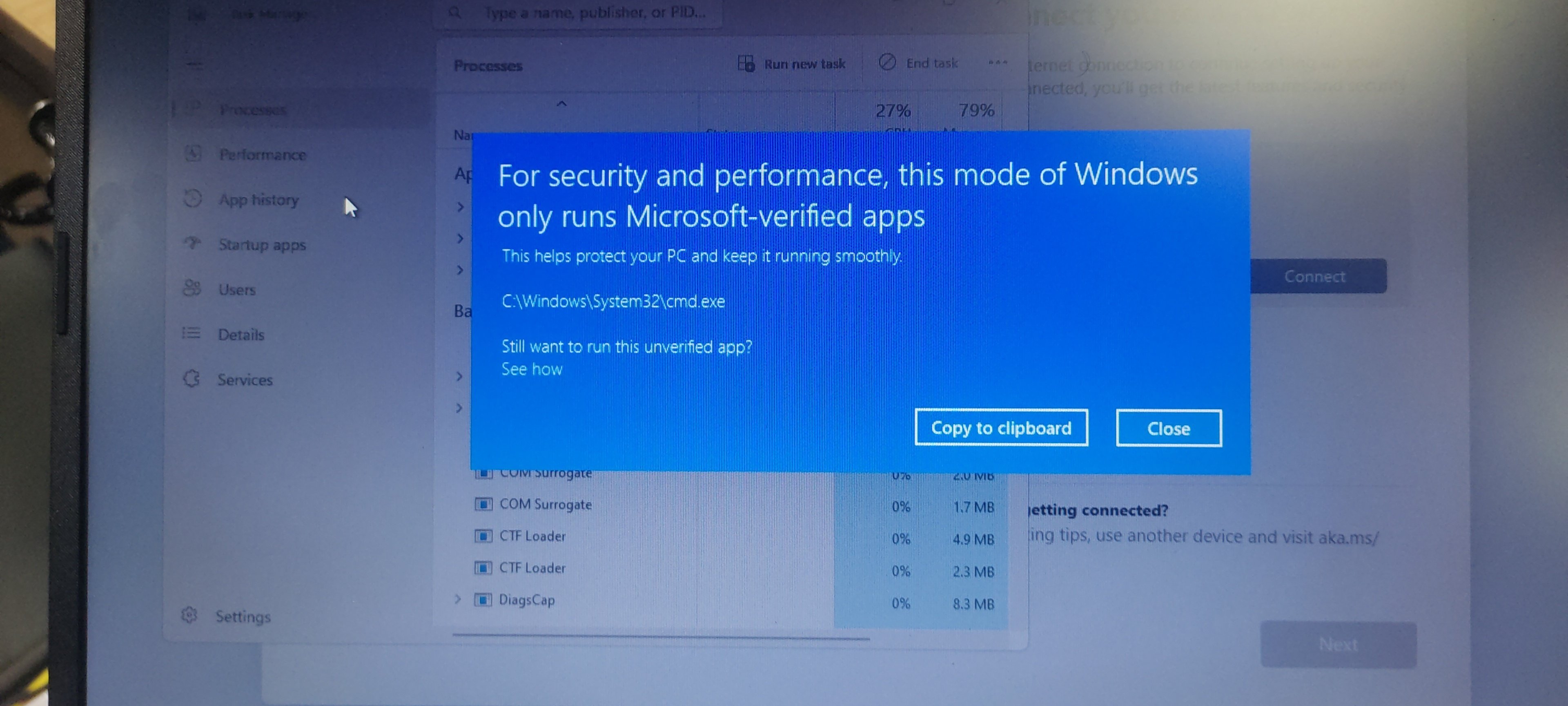
Out of curiosity, is that W11 Home or Pro? I don’t deal with home at all, I wonder if that’s the difference.
I think it was Home. I never completed the OOBE to find out.
there is another way in W.Pro: choose “for Buisness or education”, and then “To later join a domain”
Thanks for reminding me about this!
We used to use that method for the company I was working for. We would setup laptops in advance and they were in the early process of setting up intune. Since we didn’t have a user account, we’d use your method to continue setup to get to the desktop.
I think we’d then run commands in pwershell to have the machine appear on intune.
It was a good few years ago and it was a very annoying, arduous time. They worked out the kinks eventually and that was no longer required.
Good to know. thanks!
Or just select local domain login.
Garbage article. Headline interprets like Microsoft slipped or leaked something. The article discusses why the “pros” are actually “cons”.
Very common tactic for many of these sites. They’re either paid by Microsoft or they’re just run-of-the-mill Microsoft boot lickers.
If you search for how to disable or bypass something in Windows, these SEO’d junk articles pop up and trick you into reading them. It’s usually a long preamble full of arguments for why you really shouldn’t try to disable or bypass the thing, because Microsoft’s shit doesn’t actually stink, and they know better than you. Then at the bottom they put the generic instructions that may not even work anymore, that you’ve likely already read.
The pros are pros IMO. I’m not a fan of my desktop files clogging up my other computers and if the easiest way is through local accounts I’ll do just that and deprive Microsoft of trying to sell me on the functionality of their suite of subscriptions. No loss to me
Someone asked Copilot to come up with that text…
Are you talking about the Support article, or this WindowsCentral article?
Because I would say that’s true of both.
This article is heavily inflated/extended with pablum that could come straight from Copilot, and frankly, it seems more concerned with listing the benefits of a Microsoft account than reporting on the support article.
It’s AI junk all the way down.

“as explained by Microsoft on accident”?! Call me what you will but I would think the author writing articles should know it’s “by accident”
It’s a junk article, likely written by AI in part or entirely. Paragraphs and paragraphs of nothing just to reference a support article they found, all the while subtly implying a Windows account is a really good thing to use and everyone should use it.